Beat Craft
STUDIO HUMusic
4.05.19K Reviews
- Version
- 2.2.0
- Installs
- 10.00M
- Age Rating
- Everyone
Screenshots
Our Review of Beat Craft
 Analysis by Appyee
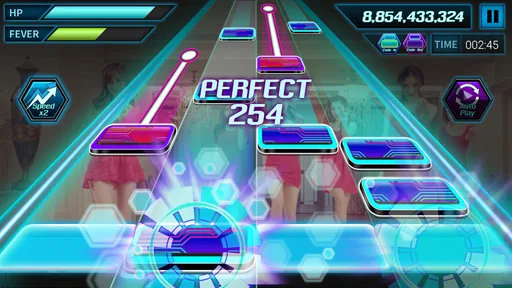
I approached Beat Craft as a music game for people who want something more visually active than simply playing songs in the background. Its central appeal is easy to understand: you play along with music while a music video provides the visual setting. That combination gives it a different feel from a conventional rhythm game built around abstract lanes, notes, or a fixed song list.
My first impression was that the game is best judged by how naturally it fits into short, repeatable play sessions. It is free to start, rated for Everyone, and available on Android devices running version 6.0 or later. That makes it approachable for a wide audience, but accessibility alone does not decide whether it is worth keeping installed. The more important question is whether you want a rhythm experience shaped by music videos rather than a tightly curated arcade presentation.
How to decide if Beat Craft fits your way of playing
The most useful decision criterion is your relationship with music games. If you enjoy reacting to a beat, watching a moving visual background, and replaying a track to improve your timing, this game has a clear reason to exist. If you prefer deep character progression, competitive rankings, or a large collection of officially presented songs, you may find its format less satisfying than other rhythm-focused options.
I would also think about where you plan to play. Beat Craft works naturally as a quick break game: a short session while waiting for an appointment, relaxing after work, or taking a few attempts at the same track before putting the phone away. It does not ask you to commit to a long campaign before you can enjoy the core activity. That low commitment is one of its strongest practical qualities.
At the same time, rhythm games are unusually sensitive to device setup. Screen size, touch response, speaker quality, and background distractions can all affect the experience. I found that the game is more enjoyable when I treat the first session as a calibration period rather than immediately judging my performance. Playing in a quiet place, keeping the display clean, and using headphones when appropriate can make timing feel more consistent.
The presentation also matters here. The music-video angle means the screen is not merely a score area. Visual motion is part of the attraction, but it can also compete with the information needed for accurate play. I recommend beginning with a song and difficulty that lets you watch the action without chasing every successful input. Once the visual rhythm becomes familiar, it is easier to decide whether the game’s style helps or distracts you.
The music-video format changes the rhythm-game experience
Many music games turn songs into carefully arranged patterns displayed against a clean, controlled interface. Beat Craft takes a more audiovisual route. The music gives you the timing foundation, while the video makes each session feel closer to interacting with a performance than following a purely abstract chart.
That distinction is important when comparing categories rather than individual competitors. A traditional rhythm game may be the better choice if you want maximum visual clarity and a highly standardized note-reading experience. Beat Craft is more appealing when atmosphere matters almost as much as precision. I see it as a bridge between a music player’s visual energy and a rhythm game’s active input.
This also creates a useful way to play when you are not chasing a perfect score. I can imagine using it as a casual music discovery tool, letting the video and rhythm provide a more engaging way to spend a few minutes. The trade-off is that players who demand strict competitive consistency may prefer a presentation with fewer visual distractions and more predictable song structure.
What makes its free entry practical
The game costs nothing to download, which lowers the risk of trying it. Its audience is already substantial, with over ten million installs and an average rating of 4.0 from around two hundred nine thousand ratings. Those figures do not guarantee that it will suit every player, but they do suggest that the basic concept has reached well beyond a small niche.
There are in-app purchases ranging from $0.99 to $9.99 per item. I would approach those purchases as optional spending rather than part of the initial decision. The sensible workflow is to play enough free content to answer three questions: do the controls feel comfortable on your device, do you enjoy the music-video presentation, and do you want longer-term variety? If the answer to all three is yes, spending may feel more reasonable. If not, paying will not solve a mismatch with the game’s basic style.
Because it is free to begin, Beat Craft is also easy to recommend to friends who are curious about rhythm games but do not want to buy one before understanding the format. It is particularly suitable for households with different levels of gaming experience, since the age rating is Everyone and the idea can be explained quickly: listen, watch, and respond to the rhythm.
Small habits that improve the first sessions
One of the most useful habits is to separate learning the song from testing your reflexes. On an unfamiliar track, I focus first on recognizing the musical phrases and the visual cues. Trying to maximize accuracy immediately can make the game feel harsher than it really is, especially when the video is busy or the beat changes.
A second practical tip is to replay a song with one specific goal instead of treating every attempt as a general score hunt. I might concentrate on staying calm through a fast section, keeping my eyes near the area where inputs appear, or resisting the urge to react early to a visual movement. This turns repetition into practice rather than frustration.
I also recommend adjusting the physical conditions before blaming the controls. A phone held loosely can make taps feel late or uneven, and a noisy environment can hide the beat that should guide your timing. Headphones can help with musical focus, although some players may prefer the phone speaker for a more relaxed session. The important point is to keep the listening setup consistent when comparing attempts.
Another overlooked trade-off is screen attention. Music-video games invite you to watch the whole display, but successful rhythm play usually requires selective focus. I get better results when I enjoy the video between demanding sections and narrow my attention during denser passages. That approach preserves the audiovisual appeal without allowing the background to take over the task.
Where Beat Craft wins, and where another category may fit better
I find Beat Craft’s clearest strength is the way it makes a short music break feel active and visual, rather than asking me to focus only on a conventional note chart. That trade-off is useful to consider before settling into a routine: the same video-led presentation that adds atmosphere may be less suitable when precision and uncluttered feedback matter most. Thinking about what you want from a music game makes the comparison with other categories much clearer.
Its strongest advantage is atmosphere with an active purpose
Beat Craft wins when a standard rhythm interface feels too sterile. The music-video presentation gives each session a stronger sense of movement, and it makes the game easier to show to someone who might not normally play mobile rhythm titles. Instead of explaining a complicated progression system, I can describe the experience in everyday terms: the song is playing, the video is moving, and my timing controls how well I keep up.
That simplicity also benefits short sessions. I do not need to build a long-term routine to get something from the game. A few attempts can be enough to reset my attention during a break. For players who enjoy repeating a favorite song and gradually becoming more comfortable with its timing, this is a satisfying loop.
The game’s release history also gives it a mature presence. It first appeared on December 10, 2017, and the current version is 2.2.0. I would not interpret that information as a promise of a particular update schedule; instead, it tells me that this is an established title rather than a brand-new experiment. The developer is STUDIO HU, and the game has had time to form a recognizable identity around its music-video approach.
Another strength is the low barrier to trial. A free game with an Everyone rating is easier to install for a casual player, a family member, or a friend who only wants to test the concept. That matters because rhythm games are personal: one player may immediately connect with the timing, while another may find the same style tiring. Free entry lets that judgment happen through experience rather than assumption.
Why dedicated rhythm-game alternatives can be better
The same visual style that makes Beat Craft distinctive can be a weakness for players who want a clean competitive tool. If your priority is reading notes with minimal interference, a lane-based rhythm game may be more comfortable. Those games often make the relationship between input and score feel more direct, while a music-video presentation can ask your eyes to divide attention between performance and interface.
Players who want a strong story, collectible characters, structured events, or a carefully managed progression path may also prefer a broader rhythm-game package. Beat Craft’s appeal is more immediate and sensory. I would not choose it expecting a role-playing layer or a long narrative campaign. It makes more sense as a focused music activity than as a complete virtual world.
There is also a difference between playing for atmosphere and playing for mastery. A player who wants to analyze patterns, compare highly precise runs, and pursue a strict competitive routine may eventually outgrow the video-centered format. That does not make Beat Craft inferior; it means the game serves a different purpose. I see it as a good first or secondary rhythm game, while a specialized alternative may be the better main game for serious score chasing.
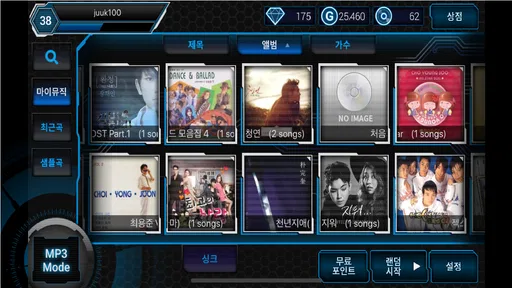
Music preferences can influence the decision as well. The game’s concept depends heavily on whether its available musical presentation appeals to you. If you need a very specific genre, artist, or curated catalog, you should evaluate the actual in-game selection before making it part of your daily routine. The visual format cannot compensate for music that you simply do not enjoy hearing repeatedly.
The real cost of switching from another rhythm game
Switching to Beat Craft is easy at the installation level, but the playing habit may feel different. Someone accustomed to fixed lanes may initially search for familiar visual landmarks. Someone coming from a music player may enjoy the active input but need time to stop watching passively and start anticipating the beat.
The best way to switch is not to abandon your usual game immediately. I would keep the familiar title for precision-focused sessions and use Beat Craft when I want a more cinematic, relaxed music experience. This two-game approach makes the difference useful instead of turning it into a direct contest that one format was never designed to win.
There is a small learning cost in finding the right balance between watching and reacting. Early attempts can feel visually crowded, particularly if you try to follow every movement on screen. I found that the game becomes more approachable when I treat the video as context and the musical pulse as the primary guide. That mental adjustment is more important than memorizing a complicated system.
Purchases are another reason to delay switching your spending habits. Since individual in-app items can cost between $0.99 and $9.99, I would first learn what keeps me returning. A player who only wants occasional sessions may never need to buy anything. A regular player may decide that additional content is worthwhile, but that choice should follow genuine use rather than the excitement of a first download.
Who should install it today
I recommend Beat Craft to casual players who want music to be the center of the game rather than a background detail. It is a good match for someone who enjoys visual performances, likes replaying tracks, and wants an uncomplicated way to fill short breaks. It is also a sensible introduction for people who have never tried a rhythm game and want to test the basic appeal without paying upfront.
It suits a realistic everyday scenario especially well: imagine having ten minutes before leaving home, putting on headphones, and playing the same song twice. The first attempt helps you remember the timing; the second lets you focus on smoother reactions. You can stop there without feeling that you have abandoned a long campaign. That compact loop is one of the clearest reasons to keep it installed.
I would be more cautious about recommending it to players who are sensitive to visual distraction, who need an extensive progression system, or who want a highly competitive interface above all else. Those players may be happier with a traditional rhythm game that places every design decision behind precise note reading. Beat Craft is not the right answer simply because it is free or popular; its value depends on wanting this particular blend of video and rhythm.
It may also be a poor fit if your phone is older or uncomfortable for fast touch play, even though the minimum operating-system requirement is Android 6.0. Compatibility with the operating system does not automatically mean that every device will feel equally pleasant during demanding sections. I would test it on the device where you intend to play and judge responsiveness, visibility, and audio comfort before spending money.
My recommendation after weighing the trade-offs
My overall view is positive, with a clear condition: choose Beat Craft for its audiovisual personality, not as a replacement for every other music game. STUDIO HU has built the experience around the feeling of playing with a music video, and that gives it a memorable place in the category. The free starting point, Everyone rating, and short-session structure make experimenting easy.
The limitations are just as important. The visual presentation may compete with precise reading, the experience may feel too light for players seeking a deep progression system, and optional purchases deserve restraint until you know what you actually want from the game. These are not minor details; they determine whether the title becomes a regular part of your routine or a brief curiosity.
If I were recommending it to a friend, I would say: install it when you want rhythm gameplay with more atmosphere than a plain note chart, try several sessions without buying anything, and pay attention to how your device handles the action. If the music-video format makes you want to replay songs, it has done its job. If you keep wishing for cleaner lanes, stronger progression, or a different music selection, a conventional rhythm alternative will probably serve you better.
Beat Craft is worth trying because its identity is clear. It is a free music game with an Everyone rating, an established release history, and a presentation that turns each track into a small audiovisual challenge. I would not call it the universal choice for rhythm fans, but for players who want to tap along while the music video remains part of the experience, it is an easy recommendation to test and a worthwhile game to keep when the format clicks.
Verdict
Strengths of Beat Craft
- Simple tap-based gameplay that is easy to learn within minutes.
- Large selection of songs keeps the rhythm challenges feeling varied.
- Bright visual effects make successful note hits satisfying.
- Short levels work well for quick gaming sessions.
- Offline play is useful when you have limited internet access.
Limitations of Beat Craft
- Song availability may vary by region or platform.
- Some tracks or features may require in-app purchases.
- Repeated patterns can make longer sessions feel predictable.
- Visual effects may be distracting on smaller screens.
- Ads can interrupt the experience for free users.
Similar Picks in This Category
View All
Tiles Hop Music & Ball Game
AMANOTES PTE. LTD.4.3

Magic Tiles 3™ - Piano Game
AMANOTES PTE. LTD.4.6

Real Piano
Bilkon3.7

Piano Game: Classic Music Song
Dream Tiles Piano Game Studio4.0

Smash Colors: Music Ball Rush
BADSNOWBALL HONGKONG LIMITED4.2

Piano Music Go-EDM Piano Games
Joy Journey Music Games4.5
Frequently Asked Questions
What is Beat Craft and how does the game work?
Beat Craft is a rhythm game that turns music into an interactive 3D track. After selecting a song, you control the game’s movement and try to hit notes or objects in time with the beat. The experience is built around timing, concentration, and musical accuracy, with faster or more complex sections becoming increasingly challenging as you progress.
Can I use my own music in Beat Craft?
One of Beat Craft’s most appealing features is its ability to create gameplay based on music available on your device or supported music sources, depending on the version and platform. Before downloading, check the app’s current permissions and compatibility requirements. Some songs may generate better tracks than others, especially music with a clear rhythm and consistent beat.
Is Beat Craft free to download and does it contain in-app purchases?
Beat Craft can generally be downloaded without an upfront purchase, but availability, advertising, and optional paid features may vary between Android and iOS versions. Some editions may include advertisements, premium content, or purchases connected with customization and additional features. It is advisable to review the store listing and payment details before confirming an installation.
Does Beat Craft require an internet connection to play?
The game may require an internet connection for downloading, accessing online music sources, displaying advertisements, checking updates, or using certain connected features. However, locally stored music and previously available content may work offline in some circumstances. Because the exact behavior can depend on your device and app version, test the game after installation if offline play is important to you.
What devices are compatible with Beat Craft, and does it require much storage?
Beat Craft is designed for mobile devices, but the required Android or iOS version can change as the developer releases updates. The game itself may not need an unusually large installation, although music files, cached content, and generated tracks can use additional storage. For smoother performance, use a reasonably modern device with available space and close unnecessary background apps.
Play our best games!


